
Contents
Learn Prompting for Free: 9 Practical AI Prompt Examples for 2026
Beginner guide for 2026: You do not need to buy a paid prompt engineering course before you understand the basics. This guide shows practical ways to learn prompting for free, with real prompt examples you can copy, edit, and test in ChatGPT, Gemini, Claude, Copilot, or Perplexity.
Learn prompting for free in 2026 by practicing with real tasks, comparing AI answers, and improving your instructions step by step. This is one of the most practical digital skills for students, bloggers, freelancers, small business owners, creators, and non-technical users.
If you are completely new to AI tools, start with this broader TwistyApps guide first: Best AI Tools for Beginners in 2026. Then return to this article to practice prompt writing with the examples below.
Free tool: not sure why your prompts fall flat? Score yours with the AI Prompt Quality Checker and see exactly what to add.
Quick Answer
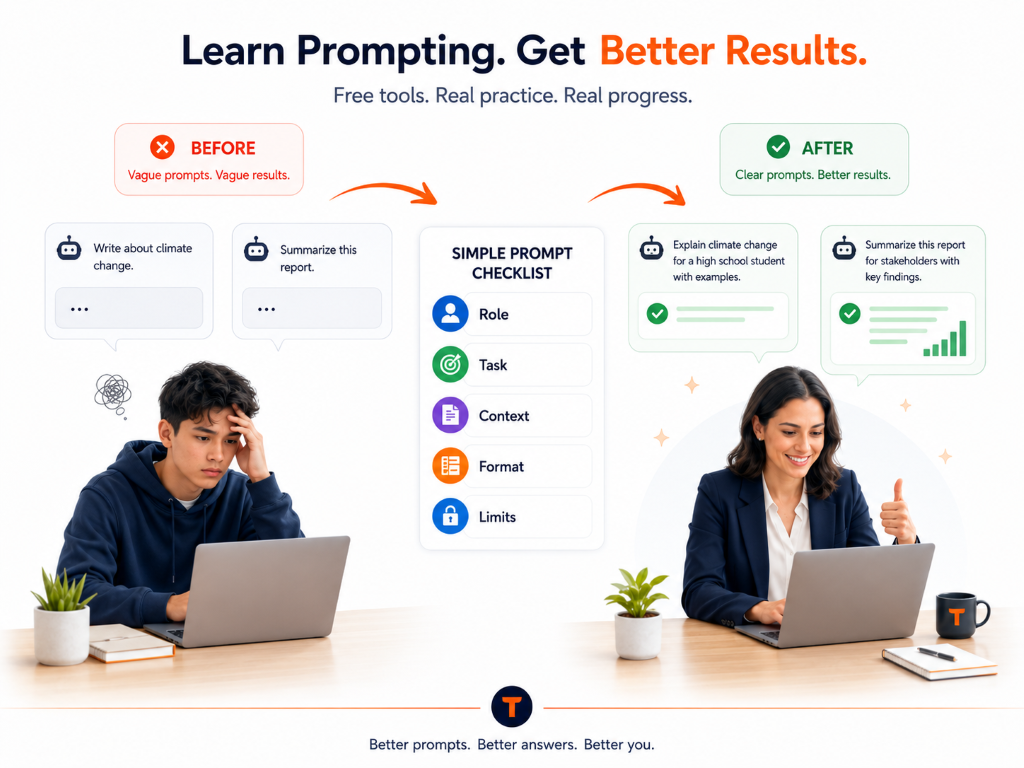
You can learn prompting for free without paid courses by using free AI tools, practicing with real problems, and following a simple prompt structure: role, task, context, format, and limits. Start with ChatGPT, Gemini, Claude, Copilot, or Perplexity. Ask one clear question, review the answer, then ask follow-up prompts to improve it. Paid courses are optional later, but beginners should practice free first.
Who This Guide Is For
- Students who want better summaries, quiz questions, and study plans.
- Beginners who are confused by AI tools and prompt engineering terms.
- Bloggers and creators who want outlines, scripts, titles, and content ideas.
- Freelancers who want faster briefs, proposals, emails, and client notes.
- Small business owners who need product descriptions, FAQs, and customer replies.
- Non-technical users who want practical AI help without learning coding.
Why It Feels Hard to Learn Prompting for Free at First
A common question beginners ask is: “Why does AI give me generic answers?” Usually, the prompt is too broad. A weak prompt says, “Write about productivity.” A better prompt says, “Create a 7-day productivity plan for a college student who has exams next month, studies 2 hours per day, and gets distracted by social media.”
Many Reddit, Quora, and YouTube discussions about AI tools repeat the same pattern: people try one short prompt, get an average answer, and assume the tool is bad. In reality, prompting is a skill. You improve results by adding context, examples, output format, audience, and constraints.
Before trusting any AI answer, especially for health, finance, legal, academic, or technical decisions, read this TwistyApps guide: How to Check AI Answers Before You Trust Them.
The Simple Prompt Formula
Use this formula:
Role + Task + Context + Format + Constraints + Follow-up
Example: “Act as a study coach. Create a 5-day revision plan for a beginner student preparing for an English exam. Use bullet points, keep each task under 30 minutes, and include one practice activity per day.”
Best Free Tools to Practice Prompting
| Tool/App | Best For | Free Plan | Ease of Use | Main Limitation | Official Source |
|---|---|---|---|---|---|
| ChatGPT | General prompting practice | Yes, verify limits | Very easy | Can make mistakes | ChatGPT pricing |
| Gemini | Google users and productivity | Yes, verify region | Easy | Features vary by country | Gemini Help |
| Claude | Long writing and summaries | Yes, verify limits | Easy | Usage limits | Claude pricing |
| Perplexity | Research with sources | Yes, verify limits | Easy | Sources still need checking | Perplexity pricing |
Pros and Cons of Learning Prompting for Free
Pros
- You can practice without paying for a course.
- Free tools are enough for basic study, writing, planning, and content ideas.
- You learn faster because you test prompts on real tasks.
- You can compare answers across ChatGPT, Gemini, Claude, and Perplexity.
Cons
- Free plans may have usage, model, upload, or speed limits.
- AI answers can be wrong, outdated, or too generic.
- There is less structure than a good paid course.
- You must verify important facts using official sources.
8 Practical Prompt Examples You Can Copy and Practice
Use these examples as training prompts if you want to learn prompting for free through practice instead of theory. Replace the details inside brackets with your own topic, class, business, niche, or project. Each prompt is longer than a normal one because it teaches you how to give the AI enough context.
Prompt 1: Learn a Difficult Topic Step by Step
Best for: students, beginners, and non-technical users
Act as a patient beginner-friendly teacher.
I am learning [topic] for the first time.
My current level is [beginner / class level / skill level].
Explain the topic in simple English.
Start with a short definition.
Then explain the idea using a real-life example.
Then give me a step-by-step explanation.
After that, give me 3 common mistakes beginners make.
Create 5 practice questions with answers.
Use bullet points and short paragraphs.
Avoid advanced terms unless you explain them.
At the end, ask me 3 questions to check my understanding.
Prompt 2: Turn Notes Into a Study Plan
Best for: students preparing for tests or exams
Act as a study planner for a busy student.
I will paste my class notes below.
Create a study plan for [number] days.
My exam is on [date].
I can study [time available] each day.
First, summarize the most important concepts.
Then divide the notes into daily study sessions.
Add one revision task for each day.
Add one short quiz for each day.
Mark the hardest topics clearly.
Tell me what to review the night before the exam.
Here are my notes: [paste notes here]
Prompt 3: Write a Blog Post Outline
Best for: bloggers, affiliate writers, and website owners
Act as an SEO content strategist.
I want to write a blog post about [topic].
The target audience is [audience].
The reader's main problem is [problem].
Create a practical article outline.
Include an H1 title and H2/H3 headings.
Add a quick answer section near the top.
Add comparison table ideas if relevant.
Add practical examples readers would care about.
Add FAQ questions for Google and AI search.
Suggest 5 internal link ideas.
Suggest 5 trusted external source types.
Avoid hype, fake statistics, and keyword stuffing.
Prompt 4: Improve a Weak AI Answer
Best for: learning how to edit AI output
Act as an editor and fact-checking assistant.
I will paste an AI-generated answer below.
Review it for clarity, usefulness, and accuracy risks.
Identify vague claims and unsupported statements.
Show me which parts need sources.
Rewrite the answer in a more practical way.
Keep the tone simple and beginner-friendly.
Add examples where the answer feels generic.
Do not invent facts or statistics.
Mark uncertain claims as "verify before publishing".
Give me a final improved version.
Here is the answer: [paste AI answer here]
Prompt 5: Create Social Media Content From One Idea
Best for: creators, freelancers, and small businesses
Act as a social media content assistant.
My topic is [topic].
My audience is [audience].
Create 5 social media post ideas.
For each idea, write a short hook.
Then write a simple caption.
Add one useful tip in each post.
Avoid clickbait and exaggerated claims.
Create one LinkedIn version.
Create one Facebook version.
Create one short X/Twitter version.
Suggest one image idea for each post.
End with a soft call-to-action.
Prompt 6: Build a Small Business Customer Reply
Best for: shops, service providers, and solo founders
Act as a polite customer support assistant.
My business sells [product/service].
A customer asked this question: [paste question].
Write a helpful reply in simple English.
Start by acknowledging the customer's concern.
Answer the question clearly.
Mention any limitation honestly.
Do not make promises I cannot guarantee.
Add a short next step for the customer.
Keep the tone friendly but professional.
Create 2 versions: short and detailed.
Also suggest one FAQ entry based on this question.
Prompt 7: Compare AI Tools Before Paying
Best for: users deciding between free and paid AI tools
Act as a practical AI tool comparison advisor.
I am comparing these tools: [tool 1], [tool 2], [tool 3].
My main use case is [writing/study/business/research/coding].
My budget is [free / monthly budget].
Create a comparison table.
Include free plan, paid plan, ease of use, and limitations.
Tell me which tool is best for beginners.
Tell me which tool is best for long-term use.
List questions I should answer before paying.
Mark all pricing details as "verify on official site".
Do not recommend paying unless there is a clear reason.
End with a simple final recommendation.
Prompt 8: Create a YouTube Script From a Topic
Best for: YouTubers, short video creators, and educators
Act as a YouTube script writer.
My video topic is [topic].
The audience is [beginners/students/business owners].
Create a 60-second script.
Start with a clear hook in the first 3 seconds.
Explain the problem in one sentence.
Give 3 practical tips.
Use simple spoken language.
Avoid fake urgency and clickbait.
Add one example the audience can relate to.
End with a natural call-to-action.
Also suggest 3 video titles and 3 thumbnail text ideas.
Prompt 9: Make AI Check Its Own Answer
Best for: safer research, writing, and decision-making
Act as a careful reviewer of your own answer.
Review the answer you just gave me.
List any claims that may be outdated.
List any claims that need official sources.
Identify assumptions you made.
Explain what could be wrong or incomplete.
Suggest what I should verify before using this.
Rewrite the answer with clearer limitations.
Do not add new facts unless you are confident.
If you are uncertain, say "I am not sure".
Give me a safer final version.
End with a short verification checklist.
How to Practice These Prompts
To learn prompting for free properly, do not paste all prompts at once. Pick one prompt, replace the brackets with your real situation, and test it in one AI tool. Then paste the same prompt into another tool and compare the answers. This is one of the fastest free ways to understand the difference between ChatGPT, Gemini, Claude, Copilot, and Perplexity.
If you want a complete learning path, continue with Learn AI in 30 Days: A Beginner Training Plan. If your focus is business, read AI for Small Business in 2026. If your focus is video, read Best AI Video Generators for Beginners.
You have the formula and eight worked examples. Now run one of your own prompts through it and see what the formula says you left out.
AI Prompt Quality Checker
Find what your prompt is missing and improve it.
Related TwistyApps Guides
Free vs Paid: Should You Buy a Prompting Course?
For beginners, the free path is usually enough. You should first learn how to ask clear questions, add context, request formats, use examples, and verify the answer. A paid course may be useful later if you need prompting for a job, business, automation workflow, coding, or professional content production.
Before paying for any AI tool or course, check the official pricing page, refund policy, feature limits, and privacy policy. AI product pricing and limits change often, so verify current details before subscribing through the official ChatGPT pricing page, Google AI plans page, or Claude pricing page.
Before You Sign Up or Pay
- Test the free version with your real task first.
- Compare output quality across at least two AI tools.
- Check whether the tool supports your country and payment method.
- Review privacy and data rules before pasting sensitive information.
- Do not paste passwords, private documents, customer data, or financial details unless you understand the tool’s settings.
- Avoid tools or courses that promise guaranteed income or secret shortcuts.
- Check cancellation and refund rules before paying.
Common Questions People Ask Before Downloading or Buying
A common question beginners ask is whether free AI tools are enough. In most cases, yes: free access is enough to learn prompting for free, summarize notes, draft outlines, and test simple workflows.
Many Reddit users compare AI tools based on limits, answer quality, privacy, and whether the paid plan is worth it. On Quora, people often ask whether prompt engineering is still useful when AI models are improving. The practical answer is that clear instructions still matter, especially when you need a specific format, audience, tone, or task.
- Is it free? Yes, you can learn the basics with free tools, but free plan limits vary.
- Does it work on Android and iPhone? Many major AI tools have mobile apps or mobile websites; verify official app listings before installing.
- Is it safe? Use official websites or app stores, and avoid sharing sensitive personal or business data.
- Is it worth paying for? Only if a paid plan solves a real limit in your work, study, or business workflow.
- What should users avoid? Avoid paid courses promising guaranteed income, secret hacks, or “perfect prompts” for everyone.
Best Choice by User Type
- Best for beginners: ChatGPT free plan or Gemini free access.
- Best for students: ChatGPT for explanations and Perplexity for source-based research.
- Best for content creators: ChatGPT or Claude for outlines, scripts, and rewrites.
- Best for small businesses: ChatGPT, Gemini, or Copilot depending on your existing workflow.
- Best free option: Start with one free AI assistant and practice daily.
- Best paid option: Upgrade only when free limits block your real work.
- Best if you care about privacy: Choose tools with clear privacy controls and avoid sharing sensitive data.
Recommendation Boxes
Best overall choice: Start with ChatGPT or Gemini for general prompting practice, then use Claude for longer writing and Perplexity for research-style questions.
Best budget choice: Stay on free plans until you hit a real usage limit. Spend time practicing before spending money.
Best premium choice: Upgrade only after testing your real workflow and checking the official pricing, cancellation, and privacy pages.
Sources and References
Use these official sources when checking pricing, plan limits, privacy, or feature claims before publishing updates:
- Official ChatGPT pricing page – free and paid plan limits.
- Official OpenAI Help Center – ChatGPT features and account guidance.
- Official OpenAI Privacy Policy – data handling and privacy details.
- Official Google Gemini Help Center – Gemini features and availability.
- Official Google AI plans page – paid Gemini/Google AI access.
- Official Claude pricing page – Claude free and paid plan limits.
- Official Anthropic Privacy Policy – Claude data handling and privacy details.
- Official Microsoft Copilot page – Copilot product features and availability.
- Official Perplexity pricing page – free and Pro plan limits.
- Google Search Central helpful content guidance – content quality guidance.
FAQs
Can I learn prompting without a paid course?
Yes. Most beginners can learn prompting for free by practicing with real tasks in ChatGPT, Gemini, Claude, Copilot, or Perplexity. Paid courses are optional after you understand the basics.
What is the easiest prompt formula for beginners?
Use role, task, context, format, and constraints. This helps the AI understand who it should act as, what you need, and how the answer should be delivered.
Which free AI tool is best for learning prompts?
ChatGPT is a strong starting point for most beginners. Gemini, Claude, Copilot, and Perplexity are also useful, especially when you compare the same prompt across tools.
How long does it take to learn prompting?
You can learn the basics in a few days with daily practice. Becoming good at prompting for work, research, business, or content takes longer because you also need to judge and improve the answers.
Is prompt engineering still useful in 2026?
Yes, but beginners should not overcomplicate it. The practical skill is giving clear instructions, useful context, examples, and limits so AI tools produce better answers.
Should students use AI prompts?
Students can use prompts for study plans, explanations, summaries, and quiz practice. They should not use AI to cheat, submit unverified work, or avoid learning the topic.
Is it safe to paste personal information into AI tools?
Be careful. Do not paste passwords, private customer data, personal documents, financial details, or sensitive business information unless you understand the tool’s privacy policy and settings.
Conclusion
You can learn prompting for free in 2026 by practicing with real tasks, using clear prompt structure, comparing AI answers, and improving your instructions. Start with free tools, test the examples in this guide, and upgrade only when a paid plan solves a real workflow problem.
Comment with your use case, such as studying, blogging, YouTube, freelancing, or business, and TwistyApps can suggest which prompt style to try first. Subscribe to TwistyApps for more beginner-friendly AI tool guides.