
Contents
Last updated: 4 July 2026.
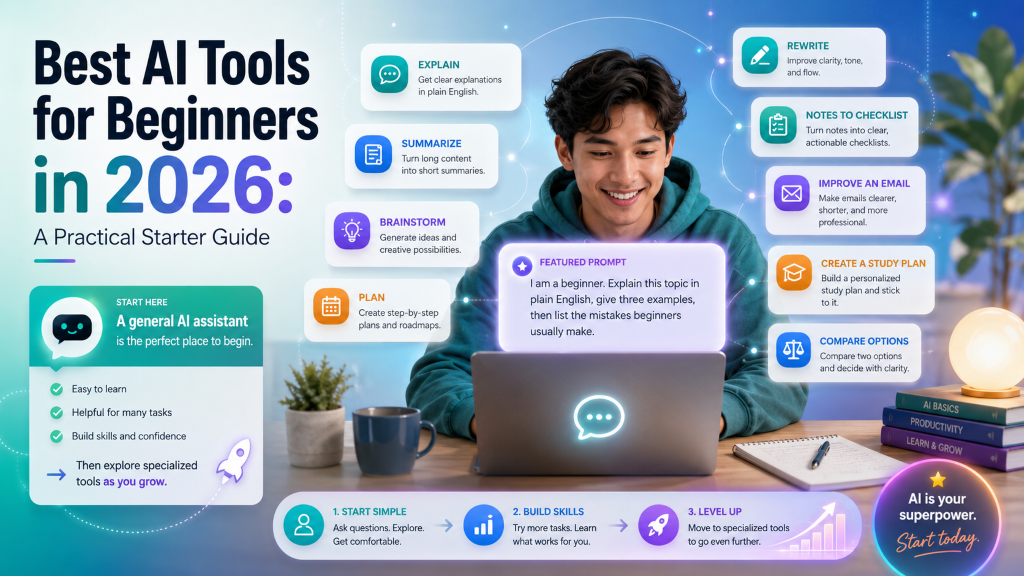
Every week there is a new AI name to feel behind on: GPT-5, Gemini, Claude Opus, Claude Sonnet, agents, tokens, context windows. If you just want to start using AI without decoding all of that, you are in the right place. This guide skips the jargon, tells you which tool to open first, and shows you exactly what to type.
Quick answer
- Start with ChatGPT. It is the easiest, most capable first tool for almost everyone, and the free plan is enough to learn on.
- Learn prompting, not model names. A clear instruction matters far more than which version number you use.
- Then pick by task: Claude for long writing, Gemini for Google apps, Perplexity for research with sources, Cursor or GitHub Copilot for real coding.
- Do not overthink it. You learn AI by using it on a real task today, not by memorizing benchmarks.
Free tool: want a plan, not just tips? The AI Learning Plan Generator builds a day-by-day path around your goal and time. It is one of six free AI tools on the site.
Is this you?
You have never really used AI and just want someone to tell you where to start.
You are drowning in model names and technical words and cannot tell which actually matter.
You want to pick the right tool for your goal, whether that is studying, writing, research, or coding.
Whichever one you are, the same first move works. Let us start with the mindset that makes all of this easy.
Do not start with model names, start with your goal
The single biggest beginner mistake is trying to understand every model and technical term before typing anything. You do not need to. Pick a real task you have right now, open one tool, and learn to describe what you want clearly. That skill, called prompting, carries across every AI tool you will ever use.
Do
Start with a goal (“help me study this”, “rewrite this email”), use one tool, and practice writing clear instructions.
Don’t
Get stuck comparing benchmarks, token limits, and version numbers before you have written a single prompt.
Key takeaway: The real skill is not memorizing model names. It is explaining your goal clearly. Everything else follows from that.
Three AI words worth knowing (in plain English)
You will meet these three terms everywhere. Here is what they actually mean, without the technical fog, so they stop being intimidating.
Prompt
A prompt is simply the instruction you give the AI. A vague prompt gives a vague answer; a clear one gives a genuinely useful answer. This is why prompting is the one skill worth practicing first.
Try this prompt
I am a grade 8 student. Explain this math problem step by step with simple examples.
Tokens (or credits)
Tokens are the usage units behind the scenes, a bit like credits. Asking a question, uploading a file, or requesting a long answer uses some. Most free plans have limits, so when you use a lot, a tool may slow down, switch to a lighter model, or ask you to wait until the limit resets. Useful to know, not worth worrying about on day one.
Context window
The context window is how much the AI can remember inside one conversation. A bigger window means you can paste longer text or upload larger files without it forgetting earlier details. It matters later for file analysis, research, and coding, not for your first simple tasks.
Tip: If you want to go deeper on prompting for free, see how to learn prompting for free. It is the highest-value beginner skill.
The best AI tools for beginners, at a glance
There is no single “best” tool, only the best fit for what you want to do. Here are the popular options side by side so you can see where each one shines before you pick.
| AI tool | Best for | Free plan | Beginner rating |
|---|---|---|---|
| ChatGPT (OpenAI) | General help, learning, writing, brainstorming, coding | Yes, with limits | Excellent |
| Claude (Anthropic) | Long writing, careful reasoning, document and code review | Yes, with limits | Excellent |
| Gemini (Google) | Google apps, Gmail and Docs help, research, Android | Yes | Very good |
| Perplexity | Research and source-based answers with citations | Yes, with limits | Very good |
| Cursor | AI coding inside a real code editor | Yes, limited | Good, with basic coding knowledge |
| GitHub Copilot | Code suggestions and chat inside your editor | Paid (free tier varies) | Excellent for developers |
| Claude Code | Agentic coding in the terminal on real projects | Included in Claude paid tiers | Advanced beginner |
| Gemini Code Assist | AI coding help inside editors and Google Cloud | Paid (free tier varies) | Very good for developers |
Free plans and limits change often. Confirm the current terms on each tool’s official page before you rely on them.
Which one should you start with?
If you take one thing from this guide: when in doubt, open ChatGPT. But if you already know your main use, here is the shortcut.
Pick by your goal
General beginner use or studying: ChatGPT (or Gemini if you live in Google apps).
Long writing and careful editing: Claude.
Research with sources you can check: Perplexity.
Real coding projects: ChatGPT to start, then Cursor or GitHub Copilot.
For most people that means ChatGPT first, because you can start in plain language with no technical commands. Just explain your goal clearly and go.
Try this prompt
I want to learn AI tools as a beginner. Create a 7-day practice plan for me with simple daily tasks.
That one prompt gives you a starting roadmap. For a fuller path, read Learn AI in 30 Days: a beginner training plan.
What you can actually do with ChatGPT on day one
Enough theory. Here are four everyday jobs a beginner can do immediately, each with a prompt you can copy and adapt. Notice how every prompt gives the AI context: who you are, what you have, and how you want the answer.
Brainstorm
Ideas fast
Learn
Hard topics
Write
And edit
Research
With checks
1. Brainstorm ideas
Stuck on a blank page? AI is a tireless idea partner for blog topics, video ideas, business names, captions, lesson plans, or project directions.
Try this prompt
I want to start a small online business in 2026. Give me 10 realistic ideas, and for each one explain the skills needed, rough startup cost, and how AI tools can help me.
2. Learn a difficult topic
This is where AI shines for students. Upload a photo of a math problem or a worksheet and ask for step-by-step help in language that fits your level.
Try this prompt
I am a class 8 student stuck on this math problem. Review the uploaded image and explain the question step by step in simple language, with a few examples and analogies so I fully understand the concept.
It works because it gives the AI your level, the subject, and how you want the answer. Students can go deeper with our guide to the best AI tools for students.
3. Write and edit
Use ChatGPT or Claude to draft emails, rewrite paragraphs, fix grammar, build outlines, or summarize long articles into a few clear points.
Try this prompt
Rewrite this message in professional English, but keep it simple and polite.
Start with one main assistant so you do not overload your workflow. When you want dedicated writing help, see the best free AI writing tools.
4. Research, then verify
Modern AI can search the web and summarize what it finds, but it can also state wrong things confidently. Always double-check anything that matters, especially health, money, legal, or pricing.
Warning: Never treat an AI answer as final on important decisions. For a simple routine, read how to check AI answers before you trust them. For research, Perplexity is handy because it shows its sources.
Using AI to build things (yes, even a game)
AI has made simple software genuinely approachable. If you understand the basics of how a program works, AI can help you build small apps, fix bugs, explain code, and add features, even if you cannot write every line yourself. A student with a little Python can build a simple Flappy Bird style game in an afternoon, as long as they explain the goal clearly.
Try this prompt (ChatGPT, Claude, Cursor, or Copilot)
I am a beginner Python student. I want to build a simple Flappy Bird style game using Python and Pygame. Please guide me step by step.
Requirements: use simple beginner code; a bird that jumps on the spacebar; pipes moving right to left; collision detection; a score counter; explain each part in simple language; give setup steps first, then the code, then how to run it; and if there are errors, help me debug them one by one.
The prompt is powerful because it states your skill level, the goal, the features, and the teaching style you want. That is prompting in action.
Honest pros and cons of the top four
The four general assistants below cover almost everything a beginner needs. Here is where each one is strong and where to be careful, so you can choose with clear eyes.
Put AI to work in real life
Once you are comfortable, point AI at something that actually pays off. Two of the most useful beginner projects are about your career, and both use nothing more than the prompting skill from this guide.
Start here: use AI to optimize your LinkedIn profile so recruiters find you, then use AI for your job search to tailor each application. Running a small business instead? See these practical AI workflows for small business.
The bottom line
Our recommendation
Do not get lost in model names, token limits, and pricing tiers. Open ChatGPT, learn to write clear prompts, and use it for learning, brainstorming, writing, research, and simple coding. When you know your needs, add Claude for writing, Gemini for Google workflows, Perplexity for research, and Cursor or GitHub Copilot for real code. The best way to learn AI is to start using it today.
Frequently asked questions
What is the best AI tool for beginners in 2026?
ChatGPT is the best starting point for most beginners because it is easy to use and works well for learning, writing, brainstorming, research, and coding help.
Is ChatGPT free?
Yes, ChatGPT has a free plan with usage limits. Paid plans add more access, more advanced models, and extra features. Confirm current terms on the official pricing page.
Should beginners learn about AI tokens first?
No. Beginners should first learn prompt writing. Tokens and context windows matter later, when you work with long files, coding projects, or heavy research.
What is a context window in AI?
A context window is how much information an AI tool can remember in one conversation. Bigger context windows help with long documents, large code files, and detailed research.
Which AI tool is best for research?
Perplexity is a strong choice because it focuses on source-based answers with citations. ChatGPT and Gemini also help with research when web search is available. Always verify important facts.
Which AI tool is best for coding?
For beginners, ChatGPT is a good starting point. For coding inside real projects, Cursor, GitHub Copilot, and Claude Code are stronger options.
Can students use AI for learning?
Yes. Students can use AI to understand topics, work through examples, and practice concepts. Use it as a learning assistant to understand the work, not just to copy answers.
Ready to build a real habit?
Follow a simple day-by-day plan to go from curious to confident with AI.
Read: Learn AI in 30 DaysRead next on TwistyApps
- Learn AI in 30 Days: a beginner training plan
- Best AI tools for students in 2026
- How to optimize your LinkedIn profile with AI
- How to use AI for your job search
- AI for small business: practical workflows
- Best AI video generators for beginners